
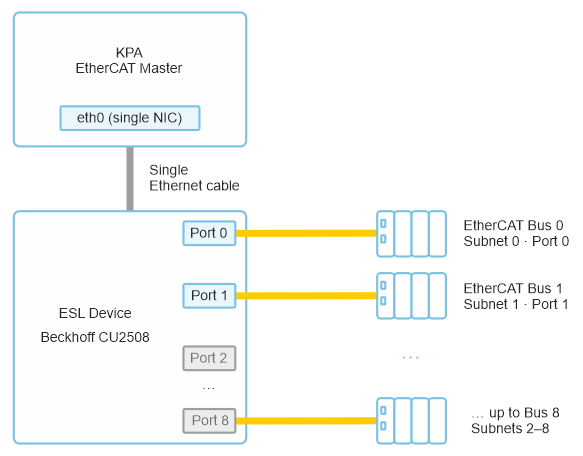
The ESL (EtherCAT Switch Link) protocol extends KPA EtherCAT Master with the ability to control multiple independent EtherCAT buses through a single physical Ethernet interface – up to 8 buses simultaneously. This eliminates the need for additional network adapters, simplifying hardware design and reducing system cost.
ESL provides real-time communication between the Master and connected devices over standard network sockets. Applications receive live system events and can issue commands remotely, enabling seamless integration with higher-level control systems, monitoring dashboards, and automated workflows.
Core Capabilities
Scale, integrate, and monitor – over a single wire
ESL provides real-time communication between the Master and connected devices over standard network sockets. Applications receive live system events and can issue commands remotely – enabling seamless integration with higher-level control systems, monitoring dashboards, and automated workflows.
Scale Without Extra Hardware
Up to 8 independent EtherCAT lines from one port
The ESL device (e.g., Beckhoff CU2508 or a compatible switch) is placed between the Master and the buses. The Master connects to a single physical Ethernet interface; the ESL device separates traffic into the required EtherCAT subnets according to the ESL header.
- Saves adapter slots, cabling, and cost
- Simpler hardware design for multi-line machines
- All buses controlled simultaneously from one Master
Hardware Timed Send over ESL
Hardware-level timing precision on the ESL path
Combined with Hardware Timed Send, each frame generated by the Master is extended with an ESL header – protocol MAC bytes, a timestamp, and destination port information. This delegates precise frame release timing from the host OS scheduler to the ESL hardware, improving determinism for cyclic frame transmission.
- Hardware-timed send on the EtherCAT path
- Simpler hardware design for multi-line machines
- All buses controlled simultaneously from one Master
How It Works
Activation is a single connection string
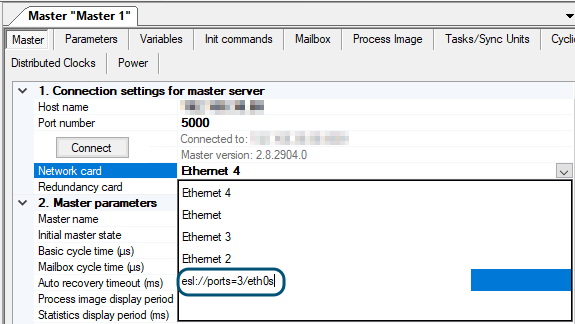
The ESL protocol is activated from the Master side through the network interface configuration. The same string is entered into the Network card field when connecting from KPA EtherCAT Studio.
Connection format
The network adapter is specified as a URI, where the port mask selects which physical ESL device ports participate in communication. Each bit of the mask corresponds to one ESL device port – bit 0 selects port 0, bit 1 selects port 1, and so on.
For example, esl://ports=3/eth0 selects ports 0 and 1 on the eth0 interface — two independent EtherCAT lines over one cable.
Where This Matters
Target applications and use cases
ESL maps directly to machine architectures where multiple EtherCAT lines must be controlled from a single controller, and where external systems need live access to bus events.
Multi-Line Machinery
Production machines with several independent EtherCAT segments – one controller, one cable to the ESL switch, up to 8 lines routed by hardware.
Compact & Cost-Sensitive Hardware
Where NIC slots are scarce, ESL replaces multiple Ethernet adapters with one port and an ESL-capable switch – cutting BOM cost and cabinet space.
Deterministic Multi-Bus Timing
With Hardware Timed Send over ESL, frame release timing is delegated to the ESL hardware – precise cyclic transmission across all routed lines.
Studio-Integrated Commissioning
The same ESL connection string works in KPA EtherCAT Studio – commissioning and diagnostics connect through the ESL device exactly as the runtime does.
Licensing
What is included – and what needs a license
The ESL protocol is included in all Master classes and does not have to be licensed separately.
You can start using ESL with any Master package right away.
Included in all Master classes
ESL protocol itself – routing across the ESL device ports, event monitoring, and integration with external systems. No separate license required.
Requires a license
Features operating over ESL that are licensed extensions, such as Hardware Timed Send. Without the license, Timed Send Emulation can imitate the timed send functionality, and the ESL protocol is used only for routing across the ESL device ports.
Limitation
ESL is not compatible with Master Redundancy and cannot be activated on adapters used for redundant Master operation.
