
Your bridge between the CAN gateway and EtherCAT
An EtherCAT CAN gateway returns a stream of CAN messages. Turning selected messages into application values normally takes extra custom logic.
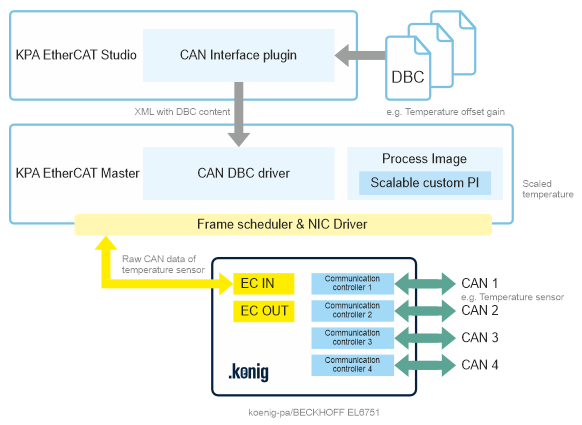
The CAN DBC driver of KPA EtherCAT Master and the CAN Interface plugin in KPA EtherCAT Studio close this gap: the driver delivers the signals, the plugin configures everything. Selected CAN messages become variables in the Master Process Image.
Supported gateways: Beckhoff EL6751 and KPA EtherCAT 4CAN Gateway.
Core Capabilities
Two components, one result: the plugin configures, the driver delivers
The gateway device – for example the EL6751 – returns a stream of CAN messages.
Making selected messages usable in the application would normally take extra custom logic. The solution consists of two components that work hand in hand: the advantages of each are shown below.
The plugin in Studio
Configure CAN from one place
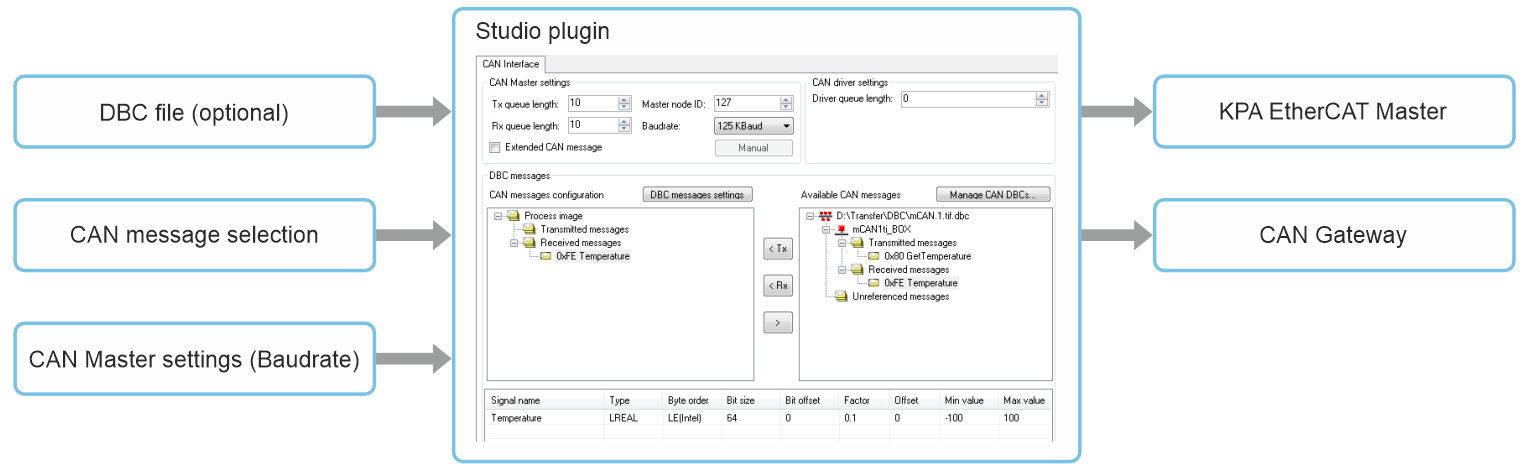
In the plugin, you select the CAN messages to map from the gateway stream and set the CAN Master parameters and the driver queue length. KPA EtherCAT Master and the CAN gateway are then configured from those settings – no separate tooling required. Selected messages are mapped to Process Image variables as raw values.
- Messages selected in Studio, from the gateway stream
- CAN Master parameters and driver queue length in one place
- Master and gateway configured from the same settings
The driver in the Master
Signals delivered to the Process Image
The CAN DBC driver, running inside KPA EtherCAT Master, is a layer over the Master Process Image. It copies CAN data from the gateway into its buffer, parses the frames according to the Studio settings, and writes the result into the custom area of the Process Image.
- Parsing follows the Studio settings
- Signals written into the custom area of the Process Image
- Handles DBC-described and unspecified CAN messages
The DBC advantage
DBC import creates the right variables automatically
Optionally, use DBC files that describe the CAN objects. At configuration time, the DBC import in the CAN Interface plugin creates the required variables with the right type and maps them automatically. At runtime, the driver applies the offset, gain, and physical unit from the DBC file to the received frames – for an analogue sensor, the application reads physical values, not raw CAN bytes.
- Variables created with the right type on import
- Automatic mapping into the Process Image
- Offset, gain, and physical unit from the DBC file
How It Works
Configuration in Studio, execution in the Master
The CAN DBC driver is a layer over the Master Process Image and works with EtherCAT CAN gateways in Raw CAN mode. It is configured through the CAN Interface plugin in KPA EtherCAT Studio. The Process Image consists of a Master area and a custom area: the Master fills the gateway data into its area, and the CAN DBC driver writes the parsed signals into the custom area, where your application reads them.
Data exchange through the driver can be done in two ways: either through the specified signals, added to the configuration from a DBC file, or by sending and receiving unspecified messages via the driver queue. This covers both directions: CAN data received from the bus, and CAN messages sent from the application to the bus. Unspecified messages are passed through the driver queue and are available to your application as raw frames – without parsing.
At runtime, the data path is fixed and predictable – from the gateway buffer, through the Master Process Image and the driver, into the custom area of the Process Image.
01
Configure in Studio
One configuration, in the Studio plugin: load a DBC file (optional), select the CAN messages to map, and set the CAN Master parameters and the driver queue length – the buffer that holds unspecified CAN messages before your application processes them. Master and the CAN gateway are configured from these settings.
Both – specified signals and unspecified messages – are set up in the same Studio plugin configuration.
02
Gateway receives CAN data
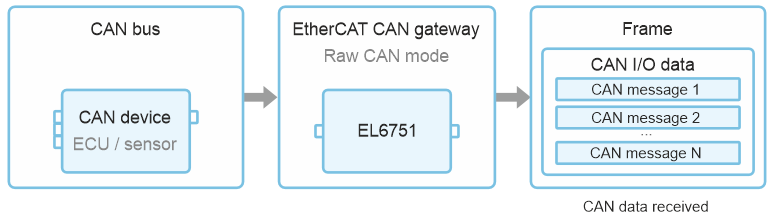
The EtherCAT CAN gateway receives CAN data from the bus into its buffer. In Raw CAN mode, frames are forwarded as received – regardless of whether they are described in the DBC file.
03
Master fills the Process Image
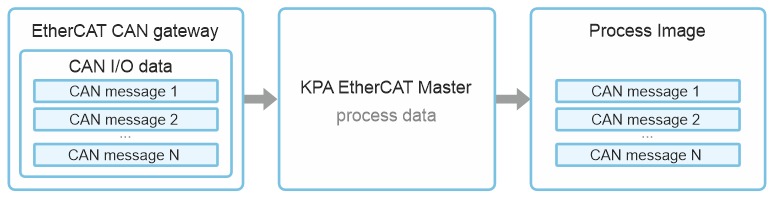
KPA EtherCAT Master takes the process data from the gateway and places it in the Process Image. From this point, the received CAN frames are available as process data within the Master.
04
Driver copies and parses the data
The CAN DBC driver copies the data into its own buffer and parses it according to the Studio settings: for specified signals, the values are calculated with the offset, gain, and unit from the DBC file; unspecified messages are handled via the driver queue.
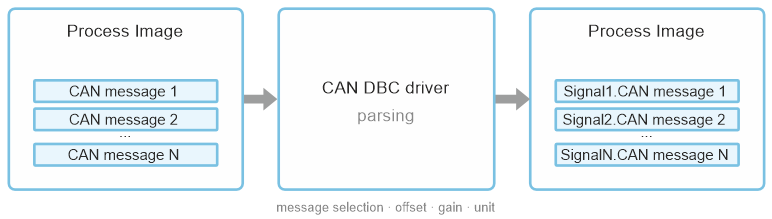
05
Signals land in the custom area
The driver writes the result into the custom area of the Process Image. Your application reads ready-to-use variables instead of decoding raw CAN bytes – with no extra custom logic on the application side.
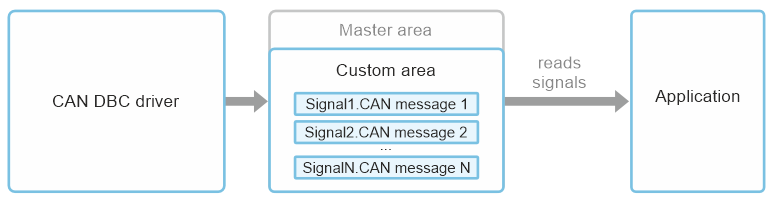
Sending data in the opposite direction
The same path works in the opposite direction: the application sets the signal in the Process Image, and from there the data travels the same route in reverse – through the CAN DBC driver and the gateway to the CAN device. This way the application controls and stimulates the CAN nodes: it sends commands to actuators and ECUs, sets test conditions on the bench, and drives the CAN devices during automated test sequences – all from the same Process Image variables, with no extra interfaces to code.

Where This Matters
Target applications and use cases
Typical setups are automotive testing environments where CAN nodes are described in DBC files and their signals must reach the Master Process Image.
Automotive Test Setup
CAN nodes such as an ECU are described in a DBC file and brought into the Master configuration in the Studio plugin.
Physical Sensor Values
An analogue sensor is read with the offset, gain, and unit defined in the DBC file – the application never decodes raw CAN bytes.
Mixed CAN Traffic
The same driver carries both DBC-described messages and unspecified CAN messages – no separate handling for raw traffic.
Legacy Equipment Support
A smooth migration path from the classic CAN standard to modern, high-performance EtherCAT – no rip-and-replace required.
Availability and Licensing
A feature of KPA EtherCAT Master – integrated into Master 2
The CAN DBC driver is a feature of KPA EtherCAT Master: it is delivered with every Master 2 – no separate component to install. Activation of the feature requires a license, purchased as a Master extension.
